Subscribe For Free Updates!

We'll not spam mate! We promise.

Showing posts with label NOKIA 5800 Xpress Music. Show all posts

Sunday, April 7, 2013

Nokia 5800 Power Switch JumperSolution


Nokia 5800 Power Switch Problem
Repairing Solutions are available in
the following article. Also you will
find Nokia 5800 Power Button
Track Ways and Jumpers
information in the diagrams further
in this post.
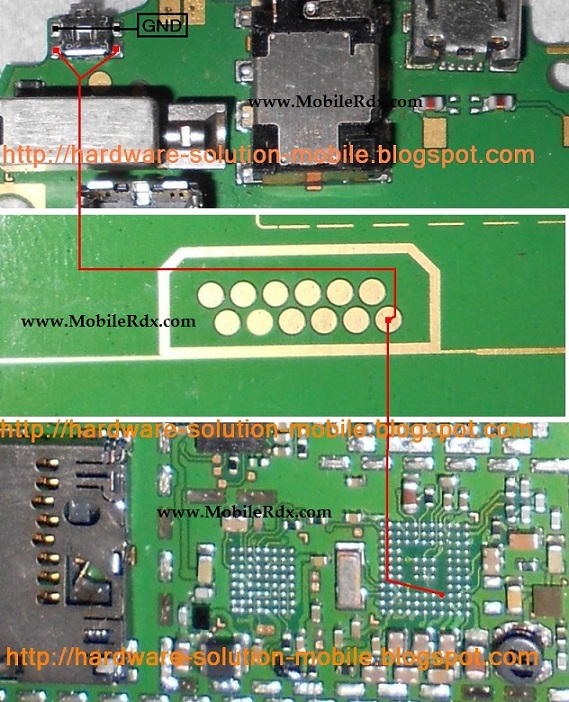
If your Nokia 5800 Power Button
Ways or Power Switch also known
as On/Off Switch is damaged
somehow by whether mishandling
or any other reason you can always
replace it with a new one. But if
the Power Button prints meaning
Connection points on which the the
Power Button is soldered to
the Nokia 5800 Power Switch
Ways on motherboard are broken,
Diagrams in this article can help
you.
Please Note that we will edit these
solutions or add new ones if found
in this page at any time in the
future. So feel free to come back
any time on this page to stay up to
date.
If you have further Questions
please don’t hesitate to leave a
comment.

Nokia 5800 Insert Sim Problem Solution Ways

Nokia 5800  Insert Sim Card
Problem Repairing Solutions are
available in the following article.
Also you will find Nokia
5800 Insert Sim Ways and Jumpers
information in the diagrams further
in this post.
In Nokia 5800 Insert Sim
Problem can occur because of the
faulty Sim Card Connector, Sim IC
or it’s bad connection to the Cell
Phone’s Motherboard. Bad
connections can happen for many
reasons like if it’s dropped or got
wet, bad connection may also
happen because of Carbon, Rust or
even Dirt. So first of all you should
clean Nokia 5800 Sim Card Ways ,
Sim IC, Sim Card Connector and
Motherboard of the Mobile Phone.
You Can Use any cleaning liquid for
this purpose like CTC or any other
you prefer. If you are certain that
the bad connection is not the
reason for your Mobile Phone’s
fault, then you can replace the Sim
Card Connector.
Please Note that we will edit these
solutions or add new ones if found
in this page at any time in the
future. So feel free to come back
any time on this page to stay up to
date.
If you have further Questions
please don’t hesitate to leave a
comment.
Note: Every diagram we post on
www.gauravgsm.org is tested by one or
more members of our team. Still
Use them at Your Own Risk we are
not responsible if these solutions
may cause any harm to your
phone.